When trying to use any Kubernetes CRD (or even core types) I am pretty much always pulling up a reference doc of some sort to see what fields are available and what they do. However, I have pretty much always found the options for this to be pretty bad. To remedy this, I have been working on a new tool that automatically generates documentation for Kubernetes CRDs, and I wanted to share it here.
Prior art
Typed docs generation
Most documentation auto-generates docs based on the underlying type definition (Go, Protobuf, etc). These usually use https://github.com/ahmetb/gen-crd-api-reference-docs or variations of it.
Some examples that are all roughly the same:
The problem with this is the way the user interacts with the API (YAML/JSON) is different from the underlying type definition.
Here's an example from the Gateway API docs:
infrastructureGatewayInfrastructure: Infrastructure defines infrastructure level attributes about this Gateway instance.
The problem with this is that GatewayInfrastructure is meaningless to a user! It's the name of an internal Go type which is irrelevant.
Another issue with this is that there is no way to deep-link to a specific field. This is pretty annoying when attempting to share references to things.
These giant docs are also pretty hard to navigate - the Kubernetes one is over 1000 pages long!
CLI discovery
A while back, kubectl explain was added as a pretty great CLI based way to discover fields and their documentation.
$ kubectl explain pod.spec.volumes.secret
KIND:       Pod
VERSION:    v1

FIELD: secret <SecretVolumeSource>


DESCRIPTION:
    secret represents a secret that should populate this volume. More info:
    https://kubernetes.io/docs/concepts/storage/volumes#secret
    Adapts a Secret into a volume.

    The contents of the target Secret's Data field will be presented in a volume
    as files using the keys in the Data field as the file names. Secret volumes
    support ownership management and SELinux relabeling.

FIELDS:
  defaultMode	<integer>
    defaultMode is Optional: mode bits used to set permissions on created files
    by default. Must be an octal value between 0000 and 0777 or a decimal value
    between 0 and 511. YAML accepts both octal and decimal values, JSON requires
    decimal values for mode bits. Defaults to 0644. Directories within the path
    are not affected by this setting. This might be in conflict with other
    options that affect the file mode, like fsGroup, and the result can be other
    mode bits set.
This is pretty great, and driven from the source of truth (the OpenAPI schema; not the Golang types). However, as a CLI it can be pretty annoying to navigate and share links to specific fields. There isn't really any way to explore the API, you have to know what you are looking for to find it.
kubectl-exploreputsfzfin front ofkubectl explainwhich is a pretty nice improvement, but still not ideal.
Additionally, as a CLI it's a bit limited in its ability to include code snippets, links, etc.
crd.dev and kubespec.dev
docs.crd.dev came out many years ago and has pretty much died since then, but was the first glimpse, to me, of what CRD docs should be: built around the CRD schema, in a way a user can navigate around the fields like they would in YAML. However, I found the execution of this to be a bit lacking, so mostly moved on and forgot about it for many years... until kubespec.dev came out, which is a pretty great implementation of the same idea.
Kubespec came with an extremely YAML-centric view, where each field could be expanded to show more information and sub-fields:
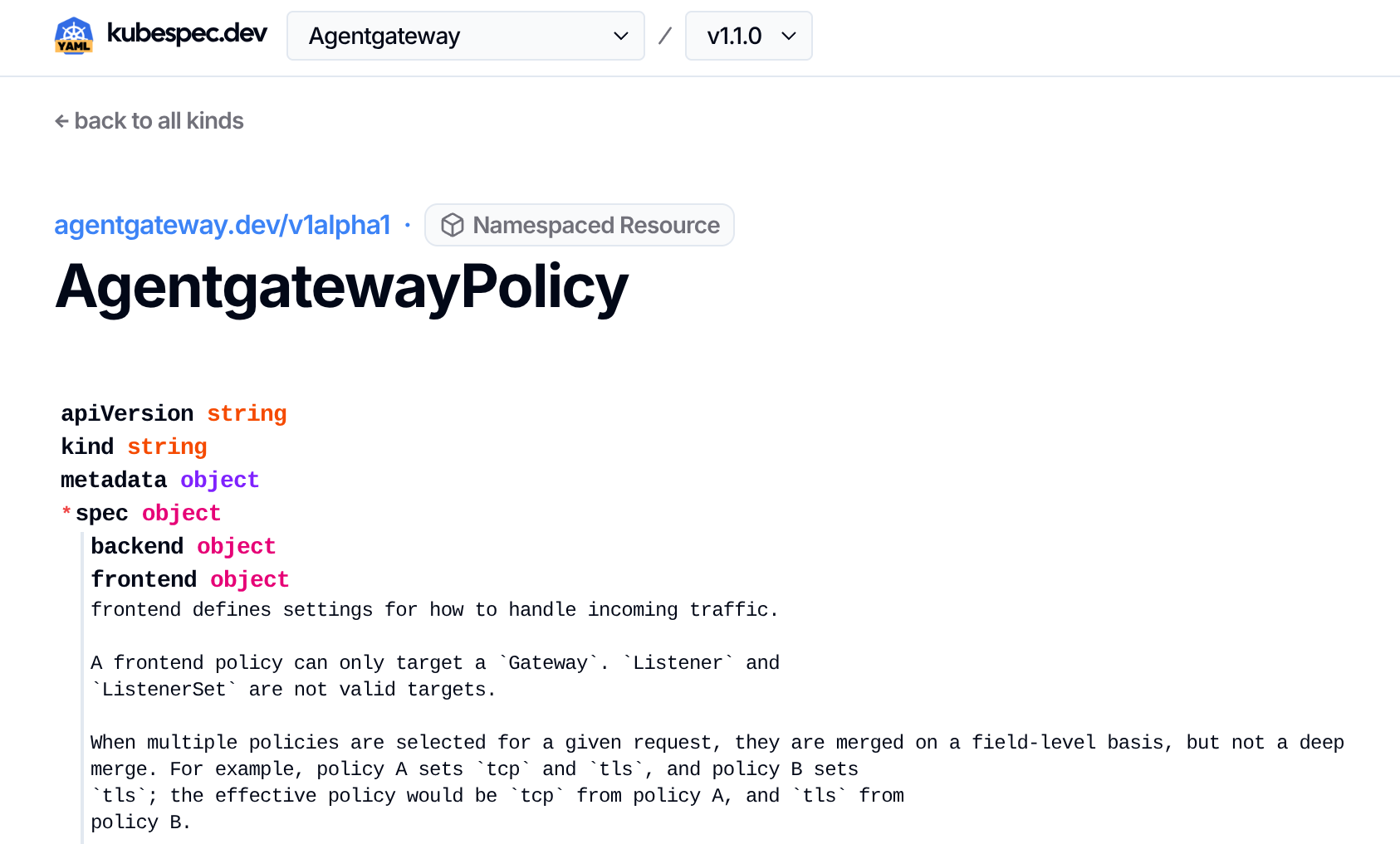
Over the past few weeks, I have been working on a clone of this idea, with some improvements of my own, to embed in our own docs.
What we built
Building on kubespec, I worked to add a few additional tweaks to ultimately launch our interactive API explorer for Agentgateway.
Here is the end result:
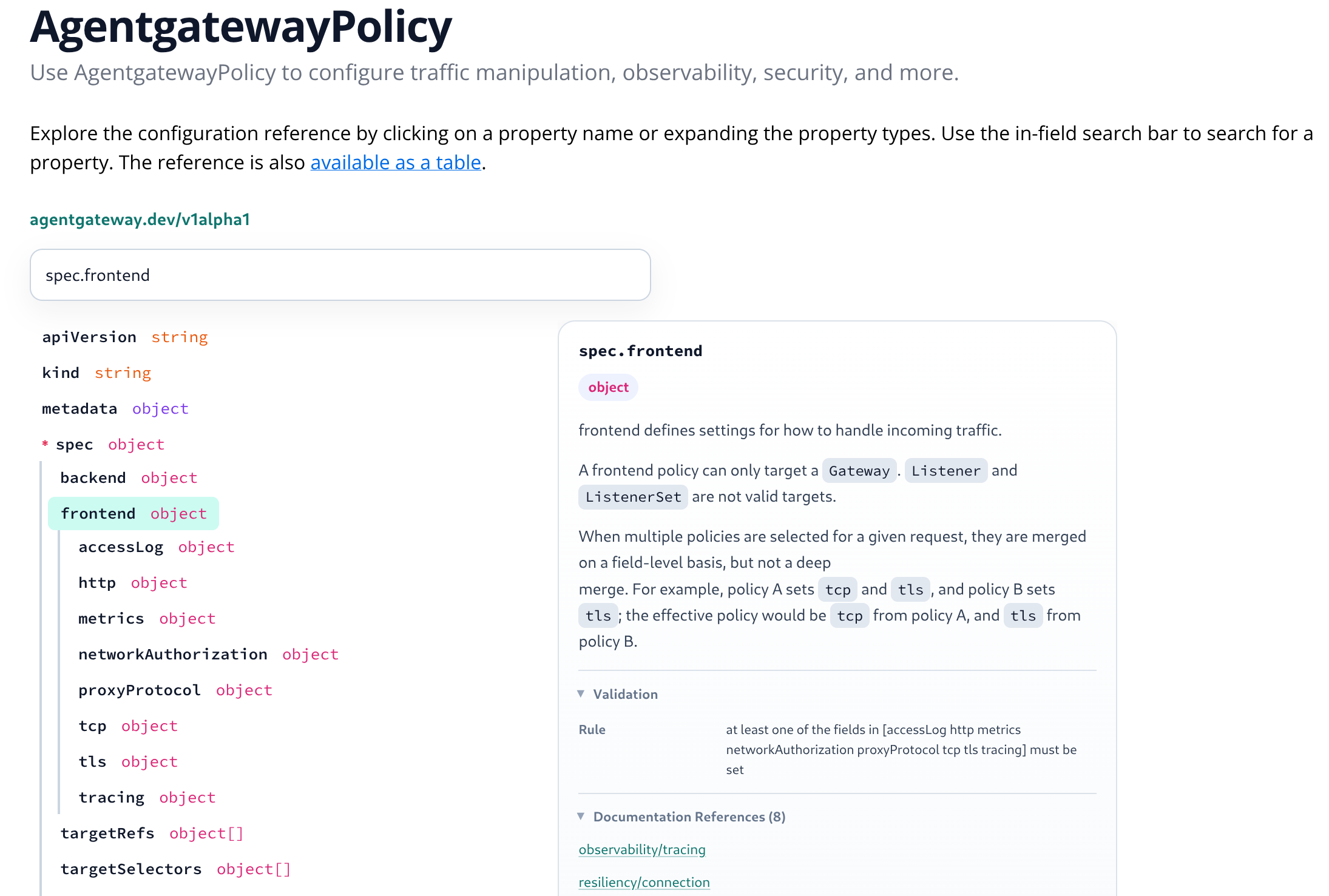
Like kubespec, the primary interface is a YAML-like structure mirroring how users interact with the API. There are a few nice things on top. All validation rules are exposed to the user. Markdown in descriptions is fully rendered
Another nice feature is search:
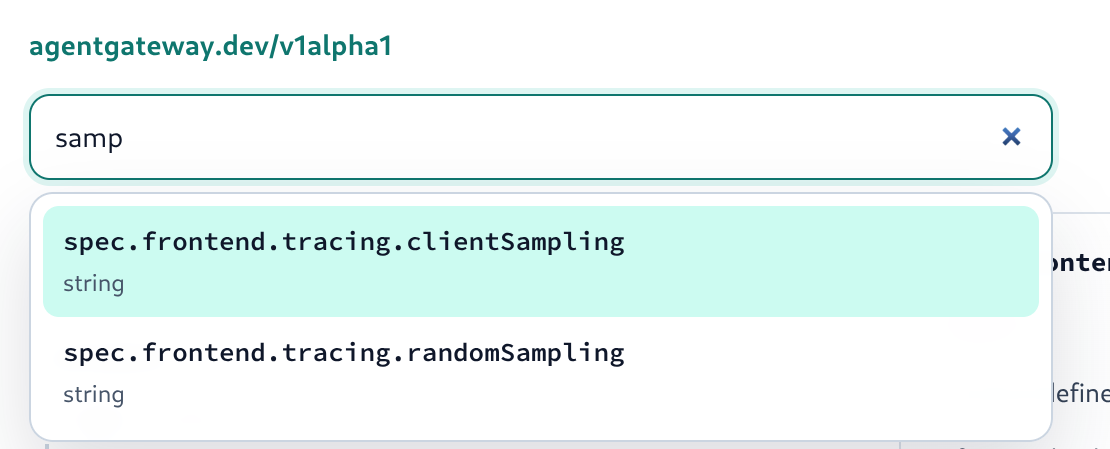
This supports fuzzy finding to help find the right field even if you are not sure exactly what to look for.
Once you do find it (through search or otherwise), deep links are available (as anchors like #spec.frontend.tracing.clientSampling -- matching the kubectl explain format!).
My favorite, though, is the "Documentation References" info. When we build the site, we keep track of all fields we set in examples throughout the documentation. Then, we link to those from each field. This gives users a one-click navigation from learning about a field to full-fledged examples and walkthroughs using it. It's also a great way for us to understand which fields we don't yet have examples for!
Non-human reads (agents) don't miss out either - the page has native support for markdown as well (both as a "Copy as Markdown" and content negotiation) rendering a compact format like below:
## Field reference

Kind: `AgentgatewayPolicy`

API version: `agentgateway.dev/v1alpha1`

Scope: `Namespaced`

apiVersion string
kind string
metadata object
spec object
  backend object
    ai object
      defaults object[]
        field string
        value object
      modelAliases object
      overrides object[]
        field string
        value object
      prompt object
        append object[]
          content string
          role string
        prepend object[]
          content string
          role string
This is probably a bit too compact, but other forms can bloat context too much. This is still an area we are working to optimize!
Try it out
If any of this sounds interesting, check out the Agentgateway docs!
While we haven't (yet?) built this as a standalone project, the code to generate this is fully open source (available here) and not tied to any specific project (it can work on any CRD or JSON Schema).